
For freelancers, the right sales outreach automation tools come down to three things: a unified workspace that handles prospecting, sequencing, and replies in one place; AI personalization that goes beyond first-name tokens; and deliverability guardrails (SPF/DKIM/DMARC, domain warmup) that protect your sender reputation before you send a single cold email.
TL;DR
- Who this suits: Freelancers and solopreneurs running outreach solo, without a sales team or a dedicated ops person.
- Quick win: Pick one tool from the shortlist below, connect your mailbox, warm it up for at least two weeks, then run the 30-minute blueprint in Section 6.
- Minimum setup: A dedicated sending domain, a connected calendar, and three to five copyable prompts from Promptlyfreelance.
- Deliverability first: Configure SPF, DKIM, and DMARC before sending anything. CAN-SPAM compliance is non-negotiable in the U.S.
Table of Contents
- Which sales outreach automation tools actually fit a freelancer?
- How have modern outreach tools changed in 2026?
- How do you pick the right outreach tool as a freelancer?
- Copyable AI prompts and a freelancer outreach workflow
- Your 30–90 minute campaign setup blueprint
- How do you measure campaign success and protect deliverability?
- U.S. compliance basics every freelancer needs to know
- Key Takeaways
- Why agent-based outreach is the right move for freelancers now
- Promptlyfreelance has the prompts and blueprints to make this work faster
- Useful sources for further reading
Which sales outreach automation tools actually fit a freelancer?
The six tools below appear most often in 2026 roundups and cover the realistic price and complexity range for independent professionals. Each has a free tier or trial, and all are available in the United States.
| Reply.io | Apollo.io | Lemlist | Instantly | Mixmax | Woodpecker | |
|---|---|---|---|---|---|---|
| Best for | Multichannel AI sequences | Budget email + lead data | Email + LinkedIn personalization | High-volume cold email | Gmail-native outreach | Agency-style cold email |
| Starting price | Free tier; paid from $29–$59/month | Free tier; paid from $29–$59/month | Free tier; paid from $29–$59/month | — | Free tier; paid from ~$29/mo | From ~$29/mo |
| Channels | Email, LinkedIn, SMS, calls | Email, phone (basic) | Email, LinkedIn, calls | Email only | Email, SMS, calls | Email, LinkedIn |
| AI & personalization | Jason AI agent; intent signals | AI sequence builder; CRM sync | Image/video personalization; AI copy | AI Copilot; lead filtering | AI email assist; smart send | AI sequence suggestions |
| Ease of use | Moderate; 30 min setup | Moderate; onboarding wizard | Moderate; dashboard can feel busy | Easy; clean UI | Easy; lives inside Gmail | Easy; guided setup |
| Deliverability & warmup | Built-in warmup; anti-spam suite | Built-in warmup; inbox placement | Free warmup; deliverability dashboard | Unlimited accounts + warmup | Basic tracking | Warmup included |
| Integrations | Zapier, HubSpot, Salesforce | Zapier, HubSpot, Salesforce | Zapier, HubSpot, Pipedrive | Zapier, HubSpot | Google Calendar, Salesforce, Zapier | Zapier, Pipedrive, HubSpot |
| Free trial | Yes | Yes (free plan) | Yes (free plan) | Yes (trial) | Yes (free plan) | Yes (trial) |
| U.S. availability | Yes | Yes | Yes | Yes | Yes | Yes |
Quick freelancer read on each:
- Reply.io covers the most channels natively. LinkedIn automation costs an extra $69/month per account, and the Jason AI agent runs as a separate tier, so watch the add-on stack before committing.
- Apollo.io bundles a lead database with outreach, which cuts total cost of ownership for freelancers who would otherwise pay separately for prospecting data.
- Lemlist shines on personalization depth — image and video variables in emails — but the dashboard takes a session or two to feel natural.
- Instantly is the cleanest option for pure email volume. Unlimited accounts and warmup make it popular with agencies, though it covers no LinkedIn or phone channels.
- Mixmax lives inside Gmail, so setup is nearly instant. Best for freelancers already working in Google Workspace who want scheduling and tracking without switching platforms.
- Woodpecker is straightforward and well-suited to freelancers managing a handful of client campaigns simultaneously, with solid deliverability defaults out of the box.
Pricing signal: Most freelancers land in the $29–$59/month range for a single-seat plan. The real cost creep comes from lead database add-ons and LinkedIn automation fees. Buyer guides consistently flag these as the hidden costs that push a “cheap” tool past $150/month.
How have modern outreach tools changed in 2026?
The shift is real: today’s best platforms run autonomous AI agents that handle prospecting, draft messages, monitor replies, and escalate only the high-intent conversations to you. Mass-blast sequencing is a 2019 tactic.
Modern capabilities you should expect from any tool you trial:
- Signal-based prospecting: The agent discovers leads from live market signals (recent funding, hiring posts, product launches) rather than a static database export.
- Multi-channel sequences: Email, LinkedIn, and calls run inside one sequence with shared logic, so a reply on any channel pauses the others automatically.
- AI reply agents: The platform drafts responses, classifies intent, and routes hot leads to your inbox for a human reply.
- Unified inbox: All channel conversations appear in one place, preventing the duplicate follow-up problem that burns sender reputation.
- Auto-pause on reply: When a lead responds, the sequence stops. This is a non-negotiable guardrail, not a nice-to-have.
Personalization has also changed meaning. Inserting {{first_name}} is table stakes. Signal-based context — referencing a prospect’s recent LinkedIn post or a funding announcement — is what actually drives replies in 2026.
Pro Tip: Set an escalation rule so the AI agent flags any reply containing words like “interested,” “let’s talk,” or “send me more” and routes it to your personal inbox within minutes. Let the agent handle everything else.

How do you pick the right outreach tool as a freelancer?
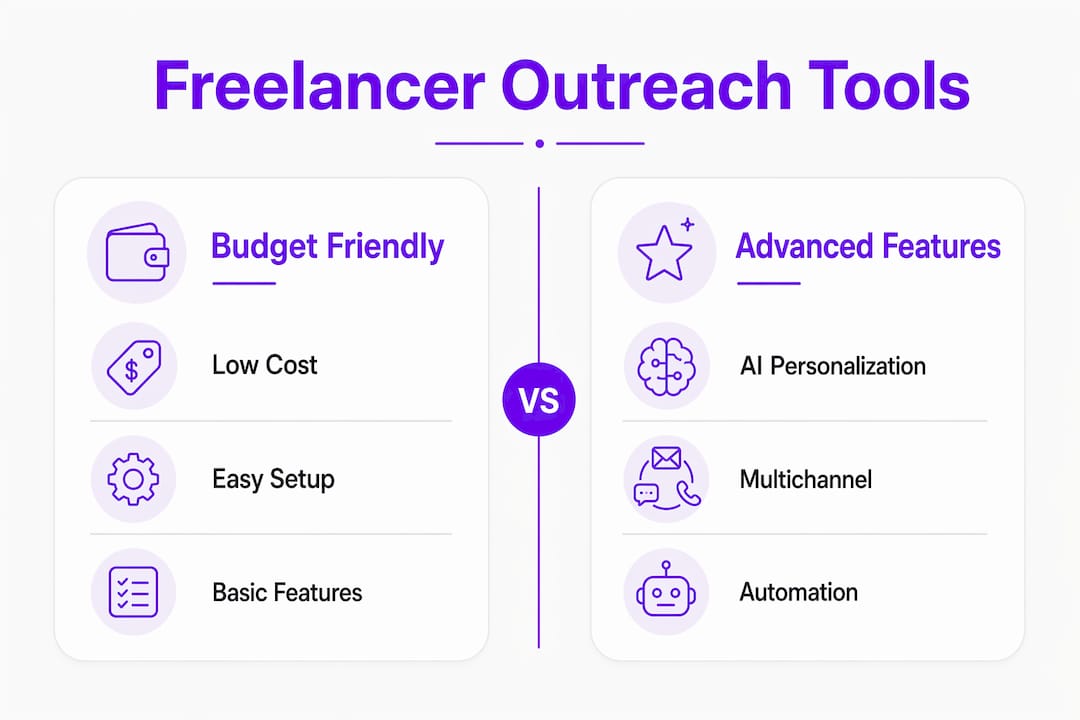
Start with must-haves, not feature lists. For a freelancer, the non-negotiables are: a unified workspace (prospecting + sequences + inbox), AI personalization beyond token insertion, auto-pause on reply, built-in warmup, and at least one native CRM or calendar integration.
Checklist before you commit to a paid plan:
- Does the free tier let you test real sequences, or just browse the UI?
- Is warmup included, or is it a paid add-on?
- Does the tool pause sequences automatically when a lead replies?
- Can you connect your calendar for direct booking inside outreach emails?
- Who owns your contact data if you cancel?
- What does support look like — live chat, email, or documentation only?
Pricing rules for freelancers:
- Start on the free tier and run at least one live sequence before paying.
- Calculate total cost including lead database access and LinkedIn add-ons.
- If the base plan plus add-ons exceeds $100/month, ask whether a unified AI workspace at a similar price covers more channels natively.
The multichannel convenience vs. subscription stack trade-off is the most common mistake freelancers make. Stitching together three cheap tools often costs more and creates context gaps where the system sends a follow-up to someone who already replied on a different channel.
Copyable AI prompts and a freelancer outreach workflow
These five prompts plus the sequence below will get you from zero to a live personalized campaign with minimal manual research. Pair them with a prompt library from Promptlyfreelance to cover the full outreach-to-proposal arc.
Prompt 1 — ICP definition:
Prompt 2 — Signal-based personalization extractor:
Prompt 3 — First outreach email:
Prompt 4 — Follow-up message:
Prompt 5 — Reply classifier:
5-step sequence:
- Day 1: Agent sends Prompt 3 email with calendar link embedded.
- Day 4: Agent sends Prompt 4 follow-up if no reply detected.
- Day 7: LinkedIn connection request (if your tool supports it natively).
- Day 10: Short LinkedIn message referencing the email thread.
- Day 14: Final “closing the loop” email; sequence ends regardless of outcome.
Pro Tip: Keep your prompt context under 800 tokens per call to avoid truncation errors. Store your ICP definition and brand voice as a reusable system prompt so you do not repaste it every session.
Your 30–90 minute campaign setup blueprint
| Step | Task | Time |
|---|---|---|
| 1 | Connect your sending mailbox; verify SPF, DKIM, DMARC | — |
| 2 | Enable warmup; set a gradual sending volume over a period long enough to establish a positive sender reputation. | 5 min |
| 3 | Define your ICP using Prompt 1 above | 10 min |
| 4 | Run prospect discovery (tool’s lead finder or a CSV upload) | — |
| 5 | Load Prompts 2–5 into the sequence builder; preview three sample emails | 20 min |
| 6 | Send a test email to yourself; check inbox placement | 5 min |
| 7 | Activate auto-pause on reply; set escalation rule for high-intent keywords | 5 min |
Validation checklist before going live:
- Test email lands in primary inbox, not promotions or spam.
- Auto-pause on reply is confirmed active.
- Calendar link resolves and books correctly.
- Unsubscribe link is present and functional (CAN-SPAM requirement).
Common onboarding hiccups:
- Missing SPF/DKIM: Your DNS records are not propagated yet. Wait 24–48 hours and recheck with MXToolbox.
- API rate limits: LinkedIn caps automated actions. Stay under 20–25 connection requests per day to avoid account flags.
- Warmup skipped: Sending cold volume from a fresh domain without warmup will land you in spam within days. Two weeks minimum, no exceptions.
For a broader look at how these patterns fit into a full freelance workflow, the automation software examples guide covers complementary tools worth stacking.
How do you measure campaign success and protect deliverability?
Track these six metrics from day one:
- Reply rate: Target 5–10% for cold email. Below 3% signals a messaging or targeting problem.
- Positive-response rate: Replies that are interested or asking questions. This is the number that actually predicts revenue.
- Conversion to meeting: How many positive replies become booked calls.
- Open rate: Useful for subject line testing, but less reliable since Apple Mail Privacy Protection inflates opens.
- Bounce rate: Keep hard bounces below 2%. Above that, pause and clean your list.
- Spam complaint rate: Google and Microsoft penalize senders above 0.1%. One complaint per 1,000 emails is already a warning sign.
Deliverability maintenance checklist:
- Rotate across multiple mailboxes if sending more than 50 emails/day.
- Monitor domain blacklist status weekly (MXToolbox or your tool’s built-in dashboard).
- Verify email addresses before adding them to sequences; most tools include a verifier.
- Keep sending cadence consistent. Sudden volume spikes trigger spam filters.
- Use visitor engagement timing data to send emails when your target audience is most active, typically Tuesday through Thursday mornings.
Distributing touchpoints across channels also helps deliverability. Two emails plus one LinkedIn message puts less pressure on your email domain than five follow-up emails to the same prospect.
U.S. compliance basics every freelancer needs to know
CAN-SPAM requires accurate sender information, a clear physical address, honest subject lines, and a working unsubscribe mechanism honored within 10 business days. It applies to commercial email, which covers virtually all cold outreach.
Practical compliance checklist:
- Include your real name and a valid U.S. mailing address in every email footer.
- Never use deceptive subject lines (“Re: our conversation” when there was none).
- Add a one-click unsubscribe link and process opt-outs within 10 business days.
- Keep records of unsubscribes and do not re-add those contacts.
- For LinkedIn outreach, follow LinkedIn’s own terms of service alongside CAN-SPAM.
On consent: CAN-SPAM does not require prior consent for B2B cold email, but sending to people with no plausible business reason to hear from you increases spam complaints and hurts deliverability. Targeting a tight, well-researched ICP is both a legal best practice and a performance one.
This section is general guidance, not legal advice. For complex situations or high-volume campaigns, consult a qualified attorney familiar with U.S. email marketing law.
Key Takeaways
The most effective freelancer outreach combines a unified AI workspace, signal-based personalization, and deliverability-first setup to generate replies without burning your sender reputation.
| Point | Details |
|---|---|
| Unified workspace first | Choose a tool that handles prospecting, sequences, and inbox in one place to avoid context gaps. |
| Warmup before sending | Run domain warmup for at least two weeks and configure SPF, DKIM, and DMARC before any cold send. |
| Signal-based personalization | Reference a real recent event (funding, hiring, product news) rather than inserting a first name token. |
| Watch add-on costs | LinkedIn automation and lead database fees can push a $37/month plan past $100/month quickly. |
| Promptlyfreelance prompts | Use the five copyable prompts and campaign blueprints from Promptlyfreelance to cut setup time to under 90 minutes. |
Why agent-based outreach is the right move for freelancers now
The conventional wisdom says freelancers should keep outreach personal and manual. There is a version of that advice that is right, and a version that wastes hours every week.
What actually matters is that the research and targeting stays sharp and human-directed. The mechanical parts — sending follow-ups, classifying replies, pausing sequences when someone responds — should run without you. Agent-based tools handle exactly that split. You define the ICP, write the core message, and set the guardrails. The agent handles the cadence.
The freelancers who get the most from these tools are not the ones who automate everything and disappear. They are the ones who use automation to protect their time for the conversations that actually matter: the high-intent reply that needs a thoughtful human response, the proposal that needs to be tailored, the relationship that needs a real person behind it. That is where AI tools for freelancers create the most leverage.
Promptlyfreelance has the prompts and blueprints to make this work faster
The tools in this article handle the sending. What most freelancers are missing is the prompt layer — the ready-to-use templates that tell those tools what to say, how to personalize, and when to escalate.
Promptlyfreelance’s outreach prompt libraries give you the five prompts above plus full campaign blueprints, deliverability checklists, and reply-classification frameworks built specifically for freelancers. No enterprise pricing, no bloated feature set — just the resources that map directly to the workflow in this article.
If you are ready to run your first automated campaign, start with the AI prompt library at Promptlyfreelance. For freelancers who want to go deeper on the proposal side once replies start coming in, the complete guide to AI client proposals covers exactly what to do after you book the meeting.
Useful sources for further reading
- Reply.io features and pricing — Official documentation on Jason AI, multichannel sequences, warmup, and add-on costs.
- Apollo.io email outreach guide — Hands-on comparison of Apollo, Lemlist, Instantly, and others with tested sequence builders.
- Mailforge AI outreach tools roundup — 2026 comparison covering deliverability features and pricing signals for freelancers and small teams.
- Overloop best AI email outreach tools — Buyer guide with deliverability-first tool comparisons and hidden cost analysis.
- Amplemarket multichannel outreach guide — Deep breakdown of channel coverage, deliverability scoring, and native vs. extension-based automation.
- Tario AI outreach features — Product page explaining prompt-to-sequence logic, auto-pause on reply, and agent routing.
- FTC CAN-SPAM compliance guide — Primary U.S. legal reference for commercial email requirements.
- Promptlyfreelance AI tools for freelancers — Expanded tool analysis and prompt resources for freelancers building outreach workflows.